



AirPods Pro 3 Metal Series Skins
4.80
(743 reviews)
$18.95
Metal Series skins pair a brushed metallic finish with premium vinyl for a clean, technical look, added grip, and lightweight everyday protection.
- Brushed Metallic Finish & Texture
- Premium Vinyl for Everyday Protection
- Precision-Cut for Your Device
- Removes Cleanly Without Sticky Residue
Premium Materials
Premium vinyl adds grip and helps resist fingerprints, scratches, and scuffs.
Perfect Fit
Precision-cut for your exact device without unnecessary bulk.
Easy Application
Bubble-free installation and clean removal without sticky residue.
Goof Policy
Mess up? One replacement is available; shipping & handling apply.
Material & Pattern Gallery
Explore Metallic Skin Finishes


Easy to install.
We’ve got your back.
Watch a quick install video, follow the step-by-step guide, or contact our support team.
Product details
Everything you need to know
Description
Looking to protect your favorite new device without covering up its beautiful design? Slickwraps is here to help! Introducing the Metal Series Wrap for your device, guaranteed to keep your new device looking as classy as the manufacturer intended. These wraps look and feel like real brushed metal.
- Fits: AirPods Pro 3
- Deep metal texture & depth
- Protects from minor scratches and small drops
- Easy, bubble-free installation and goo-free removal
- Made in the USA
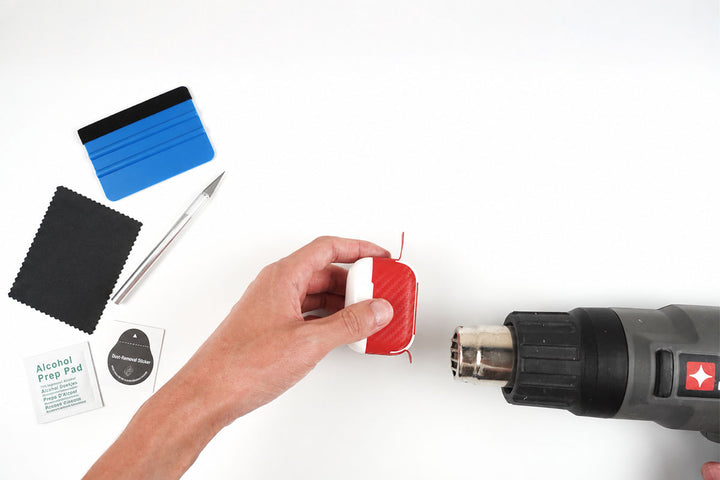
Heat plays a crucial role in the application process, particularly on non-flat surfaces. Utilizing tools like a hair dryer or heat gun is essential. The application of heat serves several purposes, such as enhancing the material's flexibility, activating the adhesive, and aiding in the seamless smoothing of edges. If you happen to observe any wrinkles during the application, gently peel the material back, apply heat, and reapply it by using a windshield wiper motion starting from the center.
Compatibility
Designed for AirPods Pro 3. Confirm your exact device model before ordering.
What’s Included
- AirPods Pro 3 Metal Series Skins
- A complimentary application kit when applicable; contents vary by device.
- This product is a vinyl skin, not a case.
- The device shown in the product photos is for demonstration only and is not included with your purchase. It is shown so you can see how the selected skin will look after installation.
Shipping & Returns
Most orders ship the same business day, though larger-quantity orders may require 1–3 business days. Available USPS, UPS, FedEx, and GlobalPost services are shown at checkout based on your destination.
Unused, unapplied non-custom products may be returned within 14 days of delivery.
See our Shipping & Delivery and Return & Refund Policy for complete details.
Frequently Asked Questions
Do the skins affect the functionality of the device?
Our skins are specifically designed not to affect the functionality of your devices. We go through extensive testing with various individuals to ensure that our skins have no negative impact on device performance.
Can I change or remove the logo cut-out on my skin?
If a logo cut-out option is available on the product page, select your preference before adding the skin to your cart. If no logo option is shown, enter your request in the order note during checkout and clearly state whether you want the logo cut-out included or removed.
Will the skin leave residue when removed?
No. Slickwraps premium adhesive is designed to remove cleanly without leaving sticky residue.
Can I use the skin with a case?
Most cases work with a skin, but very tight-fitting cases may not. Compatibility depends on the device, selected skin coverage, and the case.
What protection does a skin provide?
A skin helps protect your device’s exterior from everyday scratches, scuffs, fingerprints, and wear while adding grip without unnecessary bulk.
Why is heat important during installation?
Heat is especially important on curved or non-flat surfaces. A hair dryer or heat gun increases the vinyl’s flexibility, activates the adhesive, and helps smooth edges. If you notice a wrinkle, gently lift the affected area, apply heat, and reapply the skin from the center outward using a windshield-wiper motion.


